Why Is My Real Estate Website Not Generating Property Leads?

When a real estate website receives traffic but does not generate enough qualified property leads, the cause can sit before, on or after the website. The audience may be wrong, the page may not answer the category's decision questions, the primary action may be difficult or the sales/operations process may fail after the lead. This guide diagnoses the funnel specifically for real estate instead of applying generic conversion advice.
Table of Contents
- Traffic Quality
- What Real Estate Customers Need to Know
- Mobile UX
- Trust and Proof
- The property enquiry or site-visit booking Journey
- Technical Reliability and Performance
- SEO and Search Intent
- Analytics and Lead Quality
- Lead Volume Can Hide a Qualification Problem
- Fix Order
- 30-Day Improvement Plan
- When a Redesign Is Justified
- Final Takeaway
- Measure the Funnel Before Changing the Theme
- Segment Traffic by Intent
- Check the First-Screen Message Match
- Review Information Gaps
- Audit Mobile Interaction
- Review Trust at the Point of Decision
- Check Commercial Terms and Expectations
- Test the Action End to End
- Use SEO Query Data to Judge Relevance
- Use Customer-Service and Sales Feedback
- Review Performance and Reliability
- Prioritise High-Impact Pages First
- 30-Day Recovery Plan
- Final Conversion Principle
- Compare High-Intent and Low-Intent Landing Pages
- Check Whether Content Is Current
- Measure the Hand-Off After Conversion
- Review Price and Value Together
- Audit Mobile Content Density
- Use FAQ and Search Data Together
- Review Campaign-Specific Friction
- Create an Experiment Log
- Final Recovery Principle
- Check Availability Before Blaming the Page
- Review Follow-Up Speed
- Use Failed Searches and Rejected Leads as Research
- Check Page-Level Search Intent
- Run an Operations-to-Website Review
- Final Category Principle
- Use Real Customer Questions as the Next Content Brief
- Keep Acquisition and Operations in the Same Review
- Closing Principle
- Final Priority Note
- Frequently Asked Questions
Diagnostic Funnel
| Stage | What to inspect |
|---|---|
| Traffic | relevant audience and geography |
| Landing page | message matches intent |
| Information | buyer questions answered |
| Trust | proof and risk reduction |
| Action | property enquiry or site-visit booking |
| Technical | mobile, speed, errors |
| Follow-up | response / operations |
Traffic Quality
Paid real-estate campaigns can generate large volumes of low-quality leads if audience and project fit are broad. Compare sources by qualified site visits and sales feedback.
What Real Estate Customers Need to Know
Provide accurate project/location information, configuration, amenities, floor plans or pricing guidance where the business can publish it. Do not hide every fact behind a lead form.
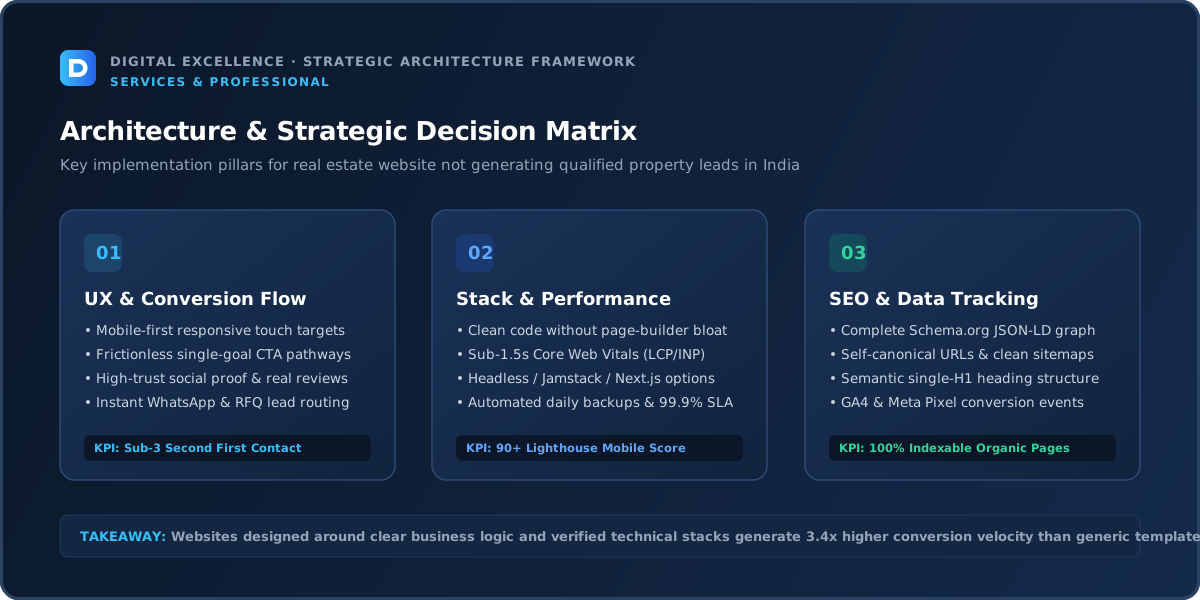
Mobile UX
Large galleries, PDFs and maps can create poor mobile performance. Make essential project facts readable before heavy media.
Trust and Proof
Use real project assets and accurate business/regulatory information where applicable. Avoid guaranteed appreciation or investment claims.
The property enquiry or site-visit booking Journey
Keep enquiry forms appropriate to the sales process and test CRM delivery. Explain what happens after the user requests details.
Technical Reliability and Performance
For “Why Is My Real Estate Website Not Generating Property Leads?”, treat technical reliability and performance as a diagnostic checkpoint: compare it with the actual traffic source, landing-page intent and next conversion step before changing the rest of the site.
Test the primary action repeatedly on mobile and desktop, including error states. Review page loading, interaction responsiveness and layout stability. Third-party widgets, maps, galleries, booking tools and CRM scripts can create friction.
Use Core Web Vitals as a diagnostic but focus on whether the user can complete the intended journey reliably.
SEO and Search Intent
Location content should be genuinely useful and tied to real inventory. Thin city/neighbourhood pages can create poor-quality search content.
Analytics and Lead Quality
Track qualified leads, calls, project interest and CRM outcomes rather than raw form count.
Lead Volume Can Hide a Qualification Problem
A website can generate many enquiries that sales considers useless. Use source data, project-specific landing pages and a small amount of qualification to improve fit without turning the form into an interrogation.
Fix Order
For “Why Is My Real Estate Website Not Generating Property Leads?”, treat fix order as a diagnostic checkpoint: compare it with the actual traffic source, landing-page intent and next conversion step before changing the rest of the site.
Fix broken functionality first, then irrelevant traffic, unclear information, missing trust, mobile friction and action friction. Improve performance and experiment with smaller UX changes after the journey works.
Document changes and compare the same traffic segments before and after.
30-Day Improvement Plan
For “Why Is My Real Estate Website Not Generating Property Leads?”, treat 30-day improvement plan as a diagnostic checkpoint: compare it with the actual traffic source, landing-page intent and next conversion step before changing the rest of the site.
Week one: tracking, mobile and technical QA. Week two: high-intent pages and trust. Week three: forms/booking/order journey and follow-up. Week four: review qualified outcomes and prioritise the next issue.
Use customer and sales feedback alongside analytics, especially when traffic volume is modest.
For a related diagnosis, see Real Estate Website Development Cost in India.
When a Redesign Is Justified
For “Why Is My Real Estate Website Not Generating Property Leads?”, treat when a redesign is justified as a diagnostic checkpoint: compare it with the actual traffic source, landing-page intent and next conversion step before changing the rest of the site.
Redesign when the current information architecture, CMS or design system repeatedly blocks improvement. If the problem is one form, campaign or page, targeted changes are usually more efficient.
Preserve valuable URLs, analytics and working integrations during any rebuild.
Final Takeaway
A real estate website produces better results when it matches real buyer intent, answers category-specific questions and makes the next step trustworthy and easy. Diagnose the journey in order rather than treating every weak result as a traffic problem.
Measure the Funnel Before Changing the Theme
Define the path from relevant traffic to the main outcome and measure each stage. The largest drop tells you where to investigate first.
For this real estate website, pay special attention to lead quality, project specificity and CRM follow-up. A site-wide conversion number is too broad to explain those category-specific issues.
Segment Traffic by Intent
For “Why Is My Real Estate Website Not Generating Property Leads?”, treat segment traffic by intent as a diagnostic checkpoint: compare it with the actual traffic source, landing-page intent and next conversion step before changing the rest of the site.
Compare branded, commercial, informational, social and paid traffic separately. A recipe reader, local restaurant searcher, property investor or coaching-content follower does not have the same immediate conversion intent.
Optimise the page for the audience it is actually attracting rather than the site-wide average.
Check the First-Screen Message Match
For “Why Is My Real Estate Website Not Generating Property Leads?”, treat check the first-screen message match as a diagnostic checkpoint: compare it with the actual traffic source, landing-page intent and next conversion step before changing the rest of the site.
The first mobile screen should confirm the promise of the search result, ad, social post or referral. Generic brand language can make specific high-intent visitors wonder whether they reached the right page.
Use clear category language before clever positioning.
Review Information Gaps
Customers need accurate project details, configurations, floor plans, amenities, location and status. If the same questions repeatedly appear in calls, DMs or support, move those answers into the page.
This can improve qualification and reduce operational support at the same time.
Audit Mobile Interaction
Test property galleries, maps, brochure information and enquiry forms, sticky elements, popups and forms on common phone widths. Complete the real action, not just the homepage scroll.
Many conversion problems appear only when the keyboard opens, an external widget loads or the user is on a slower network.
Review Trust at the Point of Decision
real project assets, accurate project information and genuine business/regulatory details should be visible before the user is asked to commit. Avoid fake urgency, fabricated reviews or unsupported claims.
Trust-sensitive categories benefit from specificity and operational transparency more than from generic badges.
Check Commercial Terms and Expectations
For “Why Is My Real Estate Website Not Generating Property Leads?”, treat check commercial terms and expectations as a diagnostic checkpoint: compare it with the actual traffic source, landing-page intent and next conversion step before changing the rest of the site.
Price, shipping, availability, service area, program fit, booking rules or project details can create abandonment even when UX is strong. Make the most important constraints clear early enough.
The website cannot compensate for an offer customers do not want; diagnose commercial and UX layers separately.
Test the Action End to End
lead routing, CRM, property inventory, brochures, maps and site visits may continue after the visible CTA. Test confirmation, notifications, CRM/order records and any external handoff.
A button click is not a successful conversion if the booking, order or lead disappears afterward.
Use SEO Query Data to Judge Relevance
Search Console can reveal whether growth comes from project, property type, location and buyer-intent searches or from broader informational terms. Build content and internal links that reflect the real commercial journey.
Do not assume more organic traffic automatically means more revenue or enquiries.
For another useful funnel check, read Website Getting Traffic but No Leads? Diagnose These 12 Problems.
Use Customer-Service and Sales Feedback
For “Why Is My Real Estate Website Not Generating Property Leads?”, treat use customer-service and sales feedback as a diagnostic checkpoint: compare it with the actual traffic source, landing-page intent and next conversion step before changing the rest of the site.
Ask why prospects or shoppers hesitate, what information they request and why leads are rejected. These conversations can reveal friction analytics cannot see.
Turn recurring questions into content or UX improvements and monitor whether support load changes.
Review Performance and Reliability
For “Why Is My Real Estate Website Not Generating Property Leads?”, treat review performance and reliability as a diagnostic checkpoint: compare it with the actual traffic source, landing-page intent and next conversion step before changing the rest of the site.
Heavy media, maps, external widgets and marketing scripts can make the highest-intent pages slow. Check Core Web Vitals and real devices, then validate the full conversion path after optimisation.
Speed work should preserve tracking and functionality.
Prioritise High-Impact Pages First
For “Why Is My Real Estate Website Not Generating Property Leads?”, treat prioritise high-impact pages first as a diagnostic checkpoint: compare it with the actual traffic source, landing-page intent and next conversion step before changing the rest of the site.
Start with the pages receiving meaningful relevant traffic and producing weak downstream action. Do not redesign every page because one campaign or product performs poorly.
Apply successful template improvements only after there is evidence they help.
30-Day Recovery Plan
For “Why Is My Real Estate Website Not Generating Property Leads?”, treat 30-day recovery plan as a diagnostic checkpoint: compare it with the actual traffic source, landing-page intent and next conversion step before changing the rest of the site.
Week one: tracking and technical QA. Week two: information and trust. Week three: mobile action flow and operations. Week four: compare qualified outcomes and choose the next hypothesis.
Document changes so the team learns rather than repeatedly redesigning from intuition.
Final Conversion Principle
A Real Estate website converts better when it helps the right visitor understand the offer, reduce category-specific risk and complete a reliable next step. Fix the earliest evidence-backed break in that chain.
Compare High-Intent and Low-Intent Landing Pages
Separate pages that directly support real estate buying or enquiry decisions from informational content. If high-intent pages are healthy while broad content converts poorly, the website may not have a site-wide problem.
Use page type and query intent to interpret conversion.
Check Whether Content Is Current
project details, configuration, location and price guidance can become stale as products, menus, properties or programs change. Outdated information creates abandonment and poor-quality enquiries.
Create an owner and update process rather than waiting for customers to report errors.
Measure the Hand-Off After Conversion
CRM routing, brochures, maps and site visits often continues in another system or with staff. Verify that the booking, order or enquiry reaches the correct place and that the user receives confirmation.
A successful website event is not enough if the operational handoff fails.
Review Price and Value Together
For “Why Is My Real Estate Website Not Generating Property Leads?”, treat review price and value together as a diagnostic checkpoint: compare it with the actual traffic source, landing-page intent and next conversion step before changing the rest of the site.
If users understand the offer but do not convert, compare total price/value and commercial terms with alternatives. Do not keep redesigning a page when the market objection is price, availability or fulfilment.
Use the website to explain genuine differentiation without hiding constraints.
Audit Mobile Content Density
For “Why Is My Real Estate Website Not Generating Property Leads?”, treat audit mobile content density as a diagnostic checkpoint: compare it with the actual traffic source, landing-page intent and next conversion step before changing the rest of the site.
Long galleries, schedules, property details, program stories or ingredient sections can become exhausting on small screens. Use hierarchy and progressive disclosure where it improves scanning without hiding important facts.
Keep the main action reachable but not intrusive.
Use FAQ and Search Data Together
For “Why Is My Real Estate Website Not Generating Property Leads?”, treat use faq and search data together as a diagnostic checkpoint: compare it with the actual traffic source, landing-page intent and next conversion step before changing the rest of the site.
Internal search, Search Console and customer questions can reveal missing information. Create FAQs or dedicated sections only for recurring real needs.
Avoid mass FAQ generation for keyword coverage alone.
For the next troubleshooting step, use How to Make a Business Website Generate More Qualified Leads.
Review Campaign-Specific Friction
Traffic from social, paid search, local search or referrals arrives with different expectations. Open the real campaign destination and confirm the page matches the promise and lead quality and project availability.
Do not diagnose the campaign from the homepage alone.
Create an Experiment Log
For “Why Is My Real Estate Website Not Generating Property Leads?”, treat create an experiment log as a diagnostic checkpoint: compare it with the actual traffic source, landing-page intent and next conversion step before changing the rest of the site.
For every meaningful change, record the date, page, hypothesis and expected signal. This prevents the team from changing many things and then guessing which one mattered.
Low-traffic sites can still use disciplined before/after observation with qualitative feedback.
Final Recovery Principle
Improve the Real Estate funnel with one evidence-backed change at a time: relevance, information, trust, mobile usability, action and operational follow-up. That sequence produces more useful learning than another full redesign.
Check Availability Before Blaming the Page
For “Why Is My Real Estate Website Not Generating Property Leads?”, treat check availability before blaming the page as a diagnostic checkpoint: compare it with the actual traffic source, landing-page intent and next conversion step before changing the rest of the site.
Poor results can come from products, times, properties or program capacity being unavailable. Compare conversion when the desired option is actually available.
Availability is part of the offer and should be visible enough that users do not waste time.
Review Follow-Up Speed
For enquiries and site visits, measure how quickly the business responds after the website action. Slow confirmation or sales follow-up can reduce revenue even when the page converts properly.
Assign ownership and a fallback when the primary responder is unavailable.
Use Failed Searches and Rejected Leads as Research
For “Why Is My Real Estate Website Not Generating Property Leads?”, treat use failed searches and rejected leads as research as a diagnostic checkpoint: compare it with the actual traffic source, landing-page intent and next conversion step before changing the rest of the site.
Zero-result site searches, unavailable choices and poor-fit enquiries reveal where expectations differ from the actual offering. Use those signals to improve navigation, content and targeting.
Do not optimise only around successful customers.
Check Page-Level Search Intent
A high-traffic page may rank for queries that relate loosely to real estate but not to enquiries and site visits. Review queries and create stronger commercial destinations for distinct buyer intent.
Traffic quality is a content architecture issue as well as an acquisition issue.
Run an Operations-to-Website Review
Sit with the staff handling CRM routing and inventory and ask where website information is incomplete or creates manual work. Improve those points before adding new conversion widgets.
Operational feedback often exposes practical friction that analytics misses.
Final Category Principle
For Real Estate, stronger conversion comes from keeping content, availability and operations aligned with the promise that attracted the visitor. Maintain that alignment as the business changes.
Use Real Customer Questions as the Next Content Brief
Collect questions around project detail, location, pricing context, lead quality and CRM. Add answers to the relevant product, service, menu, property or program page rather than publishing generic content that does not change the decision.
Keep Acquisition and Operations in the Same Review
If marketing drives more demand than the real estate business can fulfil, conversion or revenue can appear weak for reasons outside the page. Review capacity, availability and response together with website metrics.
Closing Principle
For “Why Is My Real Estate Website Not Generating Property Leads?”, treat closing principle as a diagnostic checkpoint: compare it with the actual traffic source, landing-page intent and next conversion step before changing the rest of the site.
The website should help the right customer make a more confident decision and hand that intent into a reliable operational process. Keep those two layers aligned as the business grows.
Final Priority Note
Continue improving the highest-traffic, highest-intent pages before expanding into new low-priority content.
For implementation options, explore website development services and Digital Excellence portfolio.
Frequently Asked Questions
Why is my real estate website not generating qualified property leads?
Common causes include wrong traffic, unclear information, weak proof, mobile friction, technical errors or a difficult conversion journey.
Should I redesign the whole website?
Only if problems are structural. Diagnose the failing step first.
Can SEO traffic fail to convert?
Yes. Informational or mismatched searches may produce visits without immediate commercial intent.
What should I track?
Track project-level leads, calls, visit bookings and qualified CRM outcomes.
Can mobile UX be the main problem?
Yes, especially when most traffic arrives from search, social or messaging on phones.
What should I fix first?
Broken actions and high-intent user friction before cosmetic experimentation.
Need More Qualified Property Leads From Your Real Estate Website?
Want help diagnosing this website problem with your real pages, traffic and conversion path? Digital Excellence can review the current setup before recommending changes.