How Much Does It Cost to Improve a Slow Website?

A slow website can be caused by one oversized hero image or by an entire stack of heavy themes, plugins, third-party scripts and weak hosting. Those are not the same job, which is why speed-optimisation quotes can range from a small one-time fix to a substantial engineering project. The useful question is not “How much does a 100 PageSpeed score cost?” It is which bottlenecks affect real users, which fixes are safe and what level of performance the business actually needs.
Table of Contents
- Why Speed Quotes Vary So Much
- What Core Web Vitals Actually Measure
- WordPress, Shopify and Custom Sites Need Different Fixes
- What a Good Scope Should Include
- Mobile UX and Page Experience
- SEO and Crawlability
- Performance and Engineering Quality
- Content, Proof and Trust
- Hidden and Recurring Costs
- Ownership and Handover
- How to Compare Providers
- Audit the Current Situation Before Spending
- Prepare Inputs Before the Project Starts
- Define Measurement Before Launch
- Launch QA Checklist
- What to Do in the First 90 Days
- Common Mistakes
- Decision Framework
- Final Takeaway
- Speed Work Should Begin With a Performance Budget
- Optimise the Slow Templates, Not Only the Homepage
- Third-Party Tags Need Governance
- Re-Test After Every Major Marketing Change
- Do Not Trade Reliability for a Synthetic Score
- Field Data Matters More Than a One-Time Lab Run
- Performance Ownership Should Be Shared
- Speed Optimisation Should End With Documentation
- Performance Work Is Complete Only When the Site Stays Fast
- Measure the Business-Critical Journey After Optimisation
- Frequently Asked Questions
Speed Optimisation Work Levels
| Level | Typical work | Cost tendency |
|---|---|---|
| Basic cleanup | images, caching, fonts | lower |
| CMS optimisation | theme/plugin/script review | medium |
| Ecommerce optimisation | apps, product media, tracking | medium-high |
| Custom engineering | bundles, rendering, APIs, architecture | project-specific |
Why Speed Quotes Vary So Much
A page can be slow because the server responds late, the browser downloads too much, the main image is huge, JavaScript blocks interaction or layout shifts while assets load. A competent optimisation starts with diagnosis rather than installing a generic plugin.
Ask the provider to identify the largest bottlenecks and which fixes are under their control. If third-party ad or chat scripts dominate the page, the business may need to make product decisions rather than expecting code optimisation to remove all cost.
What Core Web Vitals Actually Measure
Google's Core Web Vitals focus on loading performance, interaction responsiveness and visual stability. They are useful because they describe parts of real user experience rather than one generic speed score.
Optimisation should therefore prioritise meaningful content appearing quickly, responsive interactions and stable layout. A site can have a high lab score and still feel poor if important user journeys are confusing or network conditions differ.
WordPress, Shopify and Custom Sites Need Different Fixes
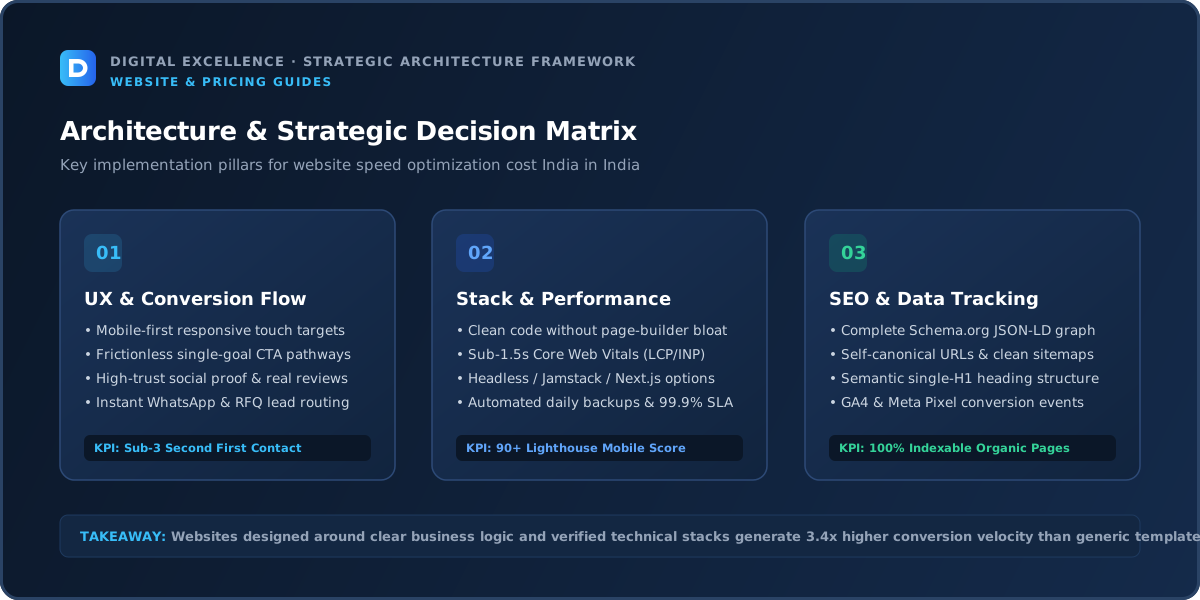
WordPress performance often involves hosting, caching, theme quality, plugins, database health and media. Shopify controls hosting, so work often focuses on themes, apps, scripts and media. Custom sites may require bundle analysis, rendering changes, API optimisation or infrastructure work.
A quote that uses the same checklist for every platform is unlikely to be diagnostic enough.
What a Good Scope Should Include
The scope should identify the exact deliverables, mobile behaviour, analytics, SEO foundations, testing, handover and post-launch responsibility. For this topic, it should explicitly cover baseline measurement, bottleneck analysis, prioritised fixes, before/after evidence, regression checks and an explanation of third-party limits.
When comparing providers, convert every marketing phrase into a task. “Fast,” “SEO-friendly,” “custom” and “optimised” are outcomes; the quote should explain the work that is expected to create them. This also makes change requests easier to identify later.
Mobile UX and Page Experience
A practical check for “How Much Does It Cost to Improve a Slow Website?” is whether mobile ux and page experience changes cost, risk, timeline or handover. If it does, make that assumption explicit before approving the project.
Mobile quality should be reviewed as a separate deliverable. Check how headings wrap, whether paragraphs are comfortable to read, whether buttons are easy to tap, whether forms fit without zooming and whether sticky elements cover content.
Google's page-experience guidance recommends content that displays well on mobile and good Core Web Vitals. For a buyer, these are useful validation tools, but the practical target is a page that real customers can understand and use on ordinary phones and connections.
SEO and Crawlability
A practical check for “How Much Does It Cost to Improve a Slow Website?” is whether seo and crawlability changes cost, risk, timeline or handover. If it does, make that assumption explicit before approving the project.
A professionally implemented page should use a descriptive URL, self-canonical, one clear H1, useful title and meta description, crawlable internal links, sitemap coverage and structured data where appropriate. If URLs change, redirects need to be planned.
Technical SEO is a foundation, not a ranking guarantee. Ongoing visibility also depends on whether the content genuinely answers the query, how competitive the topic is and whether the site builds authority over time.
Performance and Engineering Quality
A practical check for “How Much Does It Cost to Improve a Slow Website?” is whether performance and engineering quality changes cost, risk, timeline or handover. If it does, make that assumption explicit before approving the project.
Performance problems often come from accumulated decisions rather than one obvious bug: oversized media, duplicate libraries, heavy plugins, unnecessary apps, third-party tags and layout shifts. Good engineering budgets for performance during implementation.
Core Web Vitals measure loading performance, responsiveness and visual stability. Use them to find real bottlenecks, then validate on representative mobile devices. A fast benchmark with broken functionality is not the objective.
Content, Proof and Trust
A responsible performance provider should be willing to say when a score is limited by business-required scripts or when removing an app would create more operational cost than performance benefit. The goal is not to game a test; it is to make the website more usable.
The website should separate factual proof from marketing language. Use real case studies, screenshots, processes, credentials or policies where available. Do not fill gaps with fabricated numbers. Helpful content earns trust by acknowledging trade-offs and explaining when the service may not be necessary.
For a related buying decision, see Why Is My Website So Slow on Mobile? Diagnose the Real Bottleneck.
Ownership and Handover
Keep control of hosting, DNS, CDN, analytics and code. Speed work sometimes changes caching or deployment settings; those changes should be documented so future developers understand them.
The handover should leave the business able to operate, measure and transfer the asset. That normally means access to relevant accounts plus a clear description of third-party dependencies and renewal responsibilities.
How to Compare Providers
A practical check for “How Much Does It Cost to Improve a Slow Website?” is whether how to compare providers changes cost, risk, timeline or handover. If it does, make that assumption explicit before approving the project.
Compare providers against the same brief. Review relevant live work on mobile, ask who will perform the work, request the full list of inclusions and exclusions, and clarify what happens after launch.
A provider that asks thoughtful questions and explains trade-offs can be more valuable than one that agrees instantly to every requirement. Good discovery often prevents unnecessary features and inaccurate estimates.
Audit the Current Situation Before Spending
Record field and lab metrics, identify the slowest templates, compare mobile and desktop, and list major third-party scripts before touching code. For ecommerce, test collection and product templates separately because their payloads may differ.
Capture a baseline before changes begin. That might include current traffic, leads, sales, Core Web Vitals, conversion events, indexed pages, rankings or support workload depending on the project. Without a baseline, it becomes difficult to tell whether the investment improved anything except appearance.
Prepare Inputs Before the Project Starts
A practical check for “How Much Does It Cost to Improve a Slow Website?” is whether prepare inputs before the project starts changes cost, risk, timeline or handover. If it does, make that assumption explicit before approving the project.
Gather brand assets, existing analytics access, final or draft copy, product or service information, screenshots, integration credentials and examples of websites you like for specific reasons. Name one person who can approve decisions.
Projects move faster when the provider is not waiting for passwords, product data or contradictory feedback. Preparation reduces billable rework and makes it easier to protect the launch date.
Define Measurement Before Launch
Track LCP, INP and CLS where field data is available, plus business measures such as bounce, form completion or ecommerce conversion. Improvements can correlate with business outcomes, but do not promise that a specific score automatically creates more sales.
Choose a small number of metrics tied to the business goal. A lead-generation site may track qualified form submissions and calls. Ecommerce may track conversion rate, revenue, product discovery and checkout completion. Performance work should track field metrics as they become available, not only lab tests.
Launch QA Checklist
A practical check for “How Much Does It Cost to Improve a Slow Website?” is whether launch qa checklist changes cost, risk, timeline or handover. If it does, make that assumption explicit before approving the project.
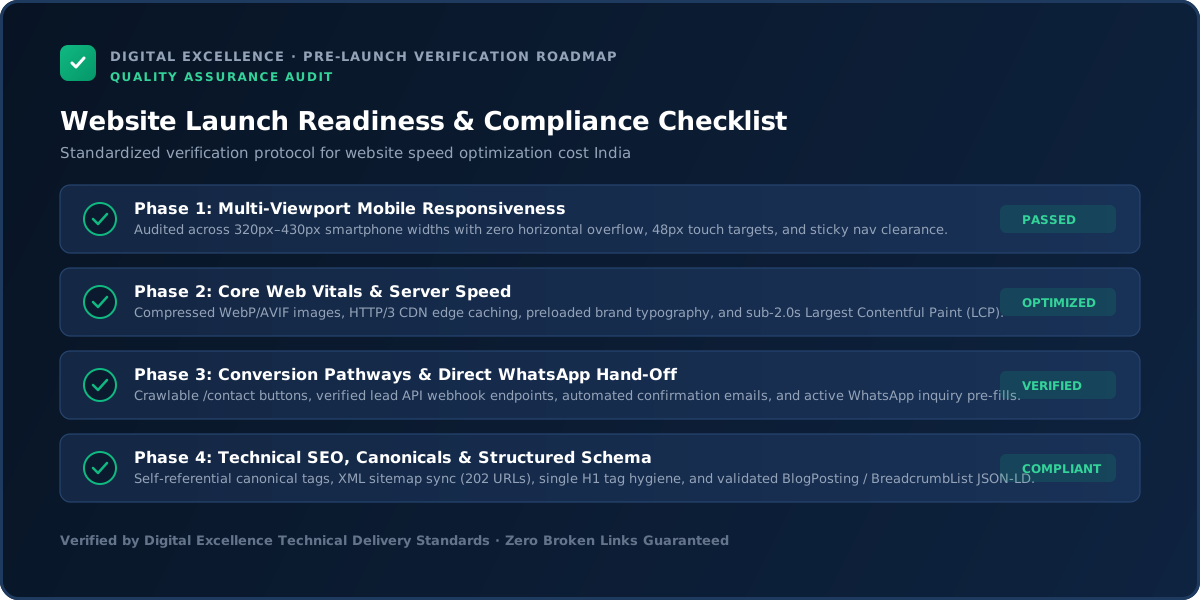
Before production, test mobile and desktop navigation, forms, error states, links, analytics, metadata, canonical URLs, sitemap, robots rules, redirects, images, accessibility basics and key user journeys. Ecommerce also needs payment, shipping and order tests.
Use a staging or preview environment where possible. After deployment, test the production domain again; configuration, cookies, DNS or third-party scripts can behave differently in production.
For a useful scope comparison, read Website Maintenance Cost in India.
What to Do in the First 90 Days
Monitor performance after marketing tags, new images, apps or plugins are added. Speed can degrade gradually. Establish a lightweight performance budget and re-test important templates after major changes.
Do not immediately rebuild the site again because one metric moves for a week. Collect enough data to identify patterns, then prioritise the highest-impact issue. SEO, conversion and performance improvements are iterative; the initial build creates the system that makes those iterations possible.
Common Mistakes
Common mistakes include chasing a perfect score, disabling functionality without business approval, optimising only the homepage, ignoring mobile field data and applying aggressive caching that breaks forms or ecommerce.
Another mistake is treating a number—price, score, ranking or delivery day—as the entire project. Use the number as a constraint or diagnostic, then evaluate whether the underlying business outcome is being achieved.
Decision Framework
Buy a basic cleanup when the problems are obvious and the stack is simple. Invest in deeper engineering when slow performance comes from architecture, revenue-critical ecommerce or a custom application.
If the scope cannot be explained in plain language, simplify it before buying. A clear decision is easier to budget, easier to build and easier to measure.
Final Takeaway
Pay for diagnosis and durable performance work, not a screenshot of one synthetic score.
The article should remain useful even if the reader never contacts Digital Excellence. That people-first standard is also the safest foundation for long-term SEO: specific answers, credible caveats, crawlable structure, excellent mobile readability and regular updates when facts or platforms change.
For implementation options, explore website development services and Digital Excellence portfolio.
Speed Work Should Begin With a Performance Budget
Set practical limits for page weight, large media, third-party scripts and interaction cost on important templates. A performance budget gives designers and marketers a constraint before new assets or tools are added.
This is more sustainable than running a rescue optimisation every few months after the site becomes heavy again.
Optimise the Slow Templates, Not Only the Homepage
Product pages, service pages, blog articles or checkout may be more commercially important than the homepage. Measure several representative templates and prioritise the pages that receive search or campaign traffic.
A homepage-only score can look excellent while users still encounter slow product galleries or forms elsewhere.
Third-Party Tags Need Governance
Create a list of analytics, advertising, chat, heatmap, review and marketing scripts, with an owner and business purpose for each. Remove tools nobody uses and avoid loading every script on every page when unnecessary.
Marketing technology often becomes the largest source of performance regression after the original development work is complete.
Re-Test After Every Major Marketing Change
Campaign teams may add pixels, popups, videos and landing-page tools. Product teams may add apps. Schedule lightweight performance checks after major changes so regressions are found quickly.
Performance is a continuing property of the website, not a one-time launch task.
For the next planning step, use Website Redesign Pricing in India : What Changes the Quote?.
Do Not Trade Reliability for a Synthetic Score
Aggressive script delays, lazy loading or caching can improve a test while breaking analytics, accessibility or interaction. Validate the full user journey after optimisation.
The target is a fast, stable website that still measures and functions correctly—not the highest possible screenshot score.
Field Data Matters More Than a One-Time Lab Run
Lab tools are useful for controlled diagnosis, but real-user field data shows what visitors experience across devices and networks. Where sufficient data exists, compare both.
If field and lab results disagree, investigate traffic mix, caching and the specific templates users actually visit.
Speed Optimisation Should End With Documentation
Record major changes, cache/CDN settings, scripts delayed or removed and any parts of the site that require caution. This reduces the chance that a future update reverses the optimisation or breaks an important dependency.
Performance Work Is Complete Only When the Site Stays Fast
After optimisation, create simple guardrails for future content and marketing changes: recommended image dimensions, video rules, script ownership and a list of high-risk components. This turns one-time speed work into a maintainable standard instead of a temporary score improvement.
Measure the Business-Critical Journey After Optimisation
Re-test forms, bookings, ecommerce and campaign tracking after performance changes. A speed improvement is only successful when the site remains accurate, measurable and easy to use.
Frequently Asked Questions
How much does website speed optimisation cost in India?
Simple fixes may cost a few thousand rupees; complex ecommerce or custom engineering can cost much more.
Can anyone guarantee a 100 PageSpeed score?
A responsible provider should not guarantee a universal score because third-party scripts, device conditions and page functionality affect results.
Do Core Web Vitals affect SEO?
Google recommends good Core Web Vitals as part of a strong page experience, but they are not the only search signals.
Will faster speed increase sales?
It can reduce friction, but sales also depend on offer, traffic, UX and trust.
Is a plugin enough for WordPress speed?
Sometimes it helps, but theme, hosting, images and plugins may require deeper work.
How often should performance be checked?
After major site changes and periodically on important templates.
Need a Performance Audit Before You Buy Optimisation?
Need a website scope or quote based on your real requirements rather than a generic package? Digital Excellence can review the pages, platform, integrations, SEO needs and launch priorities.