Why Are My Google Ads Getting Clicks but No Website Conversions?

Paid search can create a dangerous illusion: clicks prove that ads are working, but clicks are only the handoff from Google to your website. A campaign can attract the wrong searches, a landing page can fail to match the ad or conversion tracking can be broken. Before increasing bids or redesigning the entire website, diagnose the chain from search term to ad to landing page to conversion.
Table of Contents
- Start With Search Terms, Not Keywords Alone
- Keep the Landing Page Promise Consistent
- Validate Conversion Tracking
- Traffic Quality and Intent
- Mobile Experience
- Technical Reliability and Performance
- Trust and Proof
- CTA and Conversion Path
- Analytics and Attribution
- SEO and Internal Linking
- Ad Optimisation and Website Optimisation Must Work Together
- What to Fix First
- 30-Day Recovery Plan
- When a Full Redesign Makes Sense
- Final Takeaway
- Search Terms Matter More Than Click Volume
- Match Each Ad Group to the Closest Page
- Check Whether the Ad Over-Promises
- Segment Conversion by Keyword, Device and Geography
- Test the Production Page With All Marketing Scripts
- Validate Lead Quality in the CRM
- Use Call Tracking Carefully
- Check Landing-Page Form Friction
- Review Budget Only After Funnel Reliability
- Final Paid-Search Principle
- Review Match Types and Automated Expansion
- Use Negative Keywords From Real Lead Quality
- Check Ad Schedule and Device Context
- Keep Keyword, Ad and Landing Page Language Consistent
- Use Landing-Page Speed as a Paid-Media Quality Control
- Monitor Invalid or Low-Quality Traffic Signals
- Compare Cost Per Qualified Lead, Not Only Cost Per Conversion
- Final Ads-to-Website Audit
- Review Ad Copy by Lead Quality
- Check Whether the Landing Page Is Indexed Intentionally
- Use Conversion Lag in Analysis
- Check Offline Conversion Feedback
- Align Website Offers With Ad Extensions and Assets
- Closing Principle
- Review the Quality of Search Intent at the Query Level
- Keep Landing Pages Fast After Marketing Tools Accumulate
- Use Sales Outcome Data to Challenge the Campaign
- Closing Implementation Rule
- Use a Landing-Page/Keyword Matrix
- Audit Search Terms Before Every Major Landing-Page Rewrite
- Final Ads Check
- Closing SEO Note
- Final Implementation Note
- Closing Principle
- Final SEO Standard
- Frequently Asked Questions
Diagnostic Framework
| Stage | What to inspect |
|---|---|
| Search term | commercial relevance |
| Ad | promise and qualification |
| Landing page | message match |
| Mobile | loading and usability |
| Offer | value and differentiation |
| Conversion | form/checkout reliability |
| Tracking | tag/event accuracy |
Start With Search Terms, Not Keywords Alone
Broad matching and automated campaign types can surface ads for searches that look related but have weak purchase intent. Review the actual search-term data available in the advertising platform and exclude irrelevant patterns where appropriate.
A high click-through rate can still produce poor leads if the message attracts curiosity instead of fit.
Keep the Landing Page Promise Consistent
The landing page should repeat the problem, service or offer that earned the click. If the ad is specific and the page becomes generic, the visitor must rediscover why they clicked.
Use dedicated landing pages when different campaigns have meaningfully different intent or proof needs.
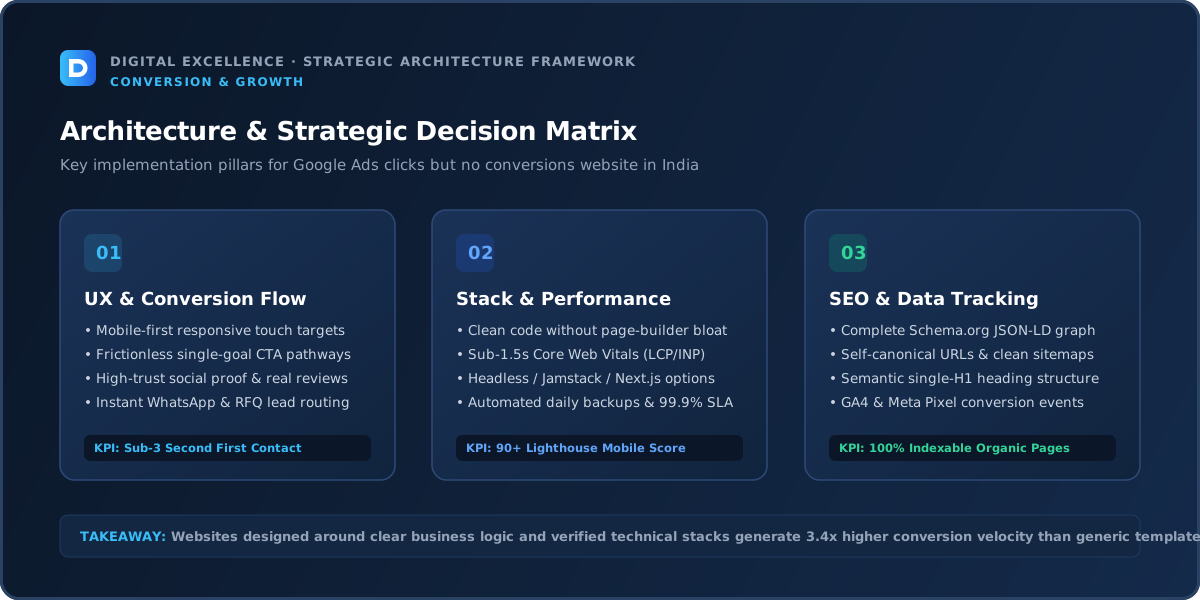
Validate Conversion Tracking
A campaign can appear to have zero conversions when form or purchase events are missing. The reverse also happens: duplicated tags inflate results.
Test conversions on the production site and compare ad-platform reporting with CRM or ecommerce records.
Traffic Quality and Intent
Paid traffic is already segmented by campaign, keyword/search term, geography and device. Use that structure to identify where conversion disappears instead of judging the website from all clicks combined.
Mobile Experience
For “Why Are My Google Ads Getting Clicks but No Website Conversions?”, treat mobile experience as a diagnostic checkpoint: compare it with the actual traffic source, landing-page intent and next conversion step before changing the rest of the site.
Review the primary journey at common phone widths. Check content priority, forms, sticky elements, buttons, page weight and whether key information is buried below decorative sections. Compare mobile and desktop within the same acquisition source when possible.
The mobile version should be intentionally designed rather than a compressed desktop layout.
Technical Reliability and Performance
For “Why Are My Google Ads Getting Clicks but No Website Conversions?”, treat technical reliability and performance as a diagnostic checkpoint: compare it with the actual traffic source, landing-page intent and next conversion step before changing the rest of the site.
Test forms, checkout, booking, call/WhatsApp links, analytics events and error states. Use Core Web Vitals and real-device testing to catch loading, responsiveness and layout-stability problems.
Technical reliability comes before optimisation experiments. If the primary action fails intermittently, no amount of copy testing will produce clean data.
Trust and Proof
High-intent ad users may compare several providers quickly. Give them specific proof, process, pricing guidance or policies that match the ad's promise.
CTA and Conversion Path
Use the primary CTA named in the campaign. If the ad says “Get a Quote,” do not make the user search for a generic contact link after landing.
Analytics and Attribution
Measure qualified leads or revenue, not only conversions. Connect advertising source to CRM outcomes where possible so campaigns optimise toward useful business results.
SEO and Internal Linking
For “Why Are My Google Ads Getting Clicks but No Website Conversions?”, treat seo and internal linking as a diagnostic checkpoint: compare it with the actual traffic source, landing-page intent and next conversion step before changing the rest of the site.
Search traffic should be analysed by query and landing page. A rise in informational traffic can be valuable without producing immediate revenue, but the site should offer contextual routes to relevant commercial content.
Use crawlable contextual internal links. Avoid publishing near-duplicate pages solely to capture keyword variants; each indexable page should have a distinct useful purpose.
Ad Optimisation and Website Optimisation Must Work Together
The media buyer can improve targeting, search terms and bidding. The website team can improve relevance, speed, proof and the conversion path. Neither team should treat the other layer as a black box.
Share landing-page performance and common lead objections with the campaign manager. Better feedback loops often create more value than isolated optimisation.
For a related diagnosis, see Landing Page Not Generating Leads? What to Fix.
What to Fix First
For “Why Are My Google Ads Getting Clicks but No Website Conversions?”, treat what to fix first as a diagnostic checkpoint: compare it with the actual traffic source, landing-page intent and next conversion step before changing the rest of the site.
Prioritise broken functionality, wrong traffic, offer mismatch, trust gaps, mobile friction and conversion-path issues before small visual experiments. Write one hypothesis for each meaningful change and record the deployment date.
This keeps optimisation connected to evidence rather than opinion.
30-Day Recovery Plan
For “Why Are My Google Ads Getting Clicks but No Website Conversions?”, treat 30-day recovery plan as a diagnostic checkpoint: compare it with the actual traffic source, landing-page intent and next conversion step before changing the rest of the site.
Week one: validate tracking and establish baseline. Week two: fix the highest-confidence content, trust and mobile issues. Week three: improve conversion steps and high-intent landing pages. Week four: compare results and decide which issue deserves the next iteration.
Do not interpret tiny samples as proof. Combine quantitative data with customer questions and sales feedback.
When a Full Redesign Makes Sense
For “Why Are My Google Ads Getting Clicks but No Website Conversions?”, treat when a full redesign makes sense as a diagnostic checkpoint: compare it with the actual traffic source, landing-page intent and next conversion step before changing the rest of the site.
Redesign when the existing architecture, CMS, design system or technology prevents repeated improvement. If the problem is one channel, one page or one broken flow, fix that directly first.
If redesigning, preserve useful URLs, content and analytics context so the new design does not reset assets that were already working.
Final Takeaway
Clicks are an acquisition event, not a business result. Align search intent, ad promise, landing page and tracking before scaling spend.
Search Terms Matter More Than Click Volume
Review the actual queries that triggered paid-search ads. Broad or automated matching can bring users whose words resemble your keyword but whose intent is informational, job-seeking or unrelated.
Negative keywords and tighter campaign structure may improve conversion more than any landing-page colour change.
Match Each Ad Group to the Closest Page
A campaign for Shopify development should not land on a generic agency homepage if a focused Shopify page exists. Preserve the service, geography and offer promised by the ad.
Message match helps users confirm that the click led to the expected destination.
Check Whether the Ad Over-Promises
An ad can earn clicks with language the landing page cannot substantiate. If the ad says instant quote, fixed price or guaranteed outcome and the page cannot deliver that, users may leave.
Align creative ambition with the actual service and next step.
Segment Conversion by Keyword, Device and Geography
A campaign average can hide that mobile, one city or one keyword group is failing. Use segment data before changing the page for everyone.
Make sure geographic targeting matches where the business can genuinely serve customers.
Test the Production Page With All Marketing Scripts
Pixels, consent tools, chat and call tracking can affect speed and forms. Test the page exactly as ad visitors see it.
A clean local development version does not reveal the full paid-traffic experience.
Validate Lead Quality in the CRM
Some ads can produce many form fills from poor-fit users. Connect source, keyword or campaign where possible to qualified lead status.
Optimising only to the cheapest lead can push campaigns toward lower-quality demand.
Use Call Tracking Carefully
If phone calls are an important conversion, track them with a setup that preserves a usable number experience and does not break business identity. Ensure the sales team can identify source without compromising call reliability.
For another useful funnel check, read Low Website Conversion Rate? Practical CRO Diagnosis.
Check Landing-Page Form Friction
Paid search users often have stronger intent than broad social traffic, but they still need a form proportional to the next step. Test field count, mobile validation and confirmation.
Ask only for information that changes sales follow-up.
Review Budget Only After Funnel Reliability
Increasing budget on a campaign with broken tracking or weak landing-page match scales waste. Fix obvious targeting and conversion problems first.
Once the funnel is trustworthy, additional spend can produce cleaner learning.
Final Paid-Search Principle
Clicks are not the goal. The search term, ad, landing page and conversion should describe one coherent customer intent from the first query to the lead or sale.
Review Match Types and Automated Expansion
Broad match and automated campaigns can reach searches outside the original keyword list. Check actual search terms and campaign settings regularly.
Automation can be useful, but it still needs business feedback about which leads are valuable.
Use Negative Keywords From Real Lead Quality
If enquiries repeatedly come from jobs, free services, tutorials or irrelevant locations, feed those patterns back into campaign exclusions where appropriate.
The landing page should not be expected to qualify traffic the ad system could have avoided.
Check Ad Schedule and Device Context
Calls or high-touch leads may convert differently during business hours. Mobile traffic may behave differently from desktop. Segment by time and device before changing bids or page design.
Align campaign delivery with the business's ability to respond when relevant.
Keep Keyword, Ad and Landing Page Language Consistent
The exact wording does not need to be identical, but the intent should be. A search for ecommerce website cost should not land on a page that only promotes generic branding services.
Specific relevance builds confidence.
Use Landing-Page Speed as a Paid-Media Quality Control
Every additional second of avoidable delay affects traffic you paid to acquire. Optimise critical media and scripts on campaign pages and test after tag updates.
Do not remove conversion tracking to improve a lab score; optimise the full production setup.
Monitor Invalid or Low-Quality Traffic Signals
Ad platforms provide various quality and invalid-traffic protections, but businesses should still watch suspicious patterns, geography and engagement. Sudden spikes in clicks without corresponding on-site behaviour deserve investigation.
Compare Cost Per Qualified Lead, Not Only Cost Per Conversion
A cheap form fill that sales immediately rejects is not efficient acquisition. If CRM data can be connected, optimise around meaningful qualification or revenue stages.
This helps marketing and sales use the same definition of success.
Final Ads-to-Website Audit
Choose one important campaign and trace a real query through ad, landing page, form and CRM. Any mismatch in message, tracking or lead routing becomes a concrete optimisation task.
Review Ad Copy by Lead Quality
Ads with the highest click-through rate are not always the most profitable. Compare which messages attract people who become qualified leads or customers.
Creative should pre-qualify as well as persuade.
For the next troubleshooting step, use Traffic Increasing but Revenue Flat? Diagnose the Gap.
Check Whether the Landing Page Is Indexed Intentionally
Paid campaign pages do not always need organic indexing. If a page is temporary or near-duplicate, decide intentionally whether it should be indexed instead of letting every campaign URL enter search.
Use Conversion Lag in Analysis
Some high-value services have longer decision cycles. A click today may become a qualified lead days or weeks later. Review attribution windows and CRM timing before judging campaigns too quickly.
Check Offline Conversion Feedback
If sales closes deals by phone or offline, import or connect qualified outcomes where technically appropriate so the advertising system learns from more than form fills.
Even without full automation, manual lead-quality reporting helps campaign decisions.
Align Website Offers With Ad Extensions and Assets
Sitelinks, callouts, price or promotion assets create expectations before the click. Make sure the landing experience supports those promises.
Closing Principle
Paid search becomes efficient when targeting, message and website qualification all reinforce the same commercial intent.
Review the Quality of Search Intent at the Query Level
Two keywords can sound similar but represent very different intent. ‘Website developer jobs’ and ‘hire website developer’ should not be treated as one audience.
Use actual search-term data and sales feedback to refine targeting.
Keep Landing Pages Fast After Marketing Tools Accumulate
New pixels, chat, heatmaps and call tracking are often added gradually. Re-audit paid landing pages periodically so the production experience remains fast enough for mobile users.
Use Sales Outcome Data to Challenge the Campaign
If one ad group creates fewer but much better leads, do not let the platform optimise only toward cheap form fills. Give marketing the downstream quality signal where possible.
Closing Implementation Rule
Trace at least one real high-value search from query to closed or rejected lead. That path reveals where targeting, website or sales process deserves the next improvement.
Use a Landing-Page/Keyword Matrix
Map each important campaign or ad group to one preferred landing page and the primary conversion. This exposes generic destinations and duplicate pages immediately.
Audit Search Terms Before Every Major Landing-Page Rewrite
If traffic intent has shifted, a page redesign may be solving the wrong problem. Marketing and website teams should review the same query data before changing the message.
Final Ads Check
Do not scale a campaign until conversion tracking, lead delivery and basic page usability are proven. More spend should amplify a functioning system, not an unknown one.
Closing SEO Note
Paid landing pages and organic pages can share design patterns without targeting identical intents. Keep indexing and canonical decisions deliberate.
Final Implementation Note
Create one dashboard from search term to qualified lead so campaign and website teams see the same funnel. When a page changes, annotate the date and compare the same intent segments before increasing budget.
Closing Principle
Paid search should be optimised using query relevance, qualified lead quality and the complete landing-page experience. Fix targeting and measurement before asking design to solve acquisition problems.
Final SEO Standard
The best paid-search landing page cannot compensate for irrelevant queries. Targeting quality and page quality must improve together.
For implementation options, explore website development services and Digital Excellence portfolio.
Frequently Asked Questions
Why do Google Ads get clicks but no leads?
Search intent, landing-page mismatch, weak offer, form friction or broken tracking can all cause it.
Should I send ads to the homepage?
Only when the homepage closely matches the campaign. Specific intent often benefits from a dedicated page.
Can Google Ads traffic be low quality?
Yes. Review actual search terms, targeting and lead quality.
How do I know tracking is broken?
Submit test conversions and compare platform events with actual CRM or order records.
Should I increase budget to get more data?
Not before obvious targeting and conversion problems are fixed.
Does Quality Score fix conversion?
Ad relevance and landing experience matter, but business conversion depends on more than the ad-platform score.
Need a Better Paid-Traffic Landing Experience?
Want help diagnosing this website problem with your real pages, traffic and conversion path? Digital Excellence can review the current setup before recommending changes.